

安装iris
go get github.com/kataras/iris
实例
注册一个route到服务的API
app := iris.New()

app.Handle("GET", "/ping", func(ctx iris.Context) {
    ctx.JSON(iris.Map{"message": "pong"})
})

app.Run(iris.Addr(":8080"))
几行代码就可以实现,通过浏览器访问http://localhost:8080/ping会返回{“message”:”pong”}
使用Handle函数可以注册方法,路径和对应的处理函数
添加middleware
如果我们希望记录下所有的请求的log信息还希望在调用相应的route时确认请求的UA是否是我们允许的可以通过Use函数添加相应的middleware
package main

import (
    "github.com/kataras/iris"
    "github.com/kataras/iris/middleware/logger"
)

func main() {
    app := iris.New()

    app.Use(logger.New())
    app.Use(checkAgentMiddleware)

    app.Handle("GET", "/ping", func(ctx iris.Context) {
        ctx.JSON(iris.Map{"message": "pong"})
    })

    app.Run(iris.Addr(":8080"))
}

func checkAgentMiddleware(ctx iris.Context) {
    ctx.Application().Logger().Infof("Runs before %s", ctx.Path())
    user_agent := ctx.GetHeader("User-Agent")

    if user_agent != "pingAuthorized" {
        ctx.JSON("No authorized for ping")
        return
    }
    ctx.Next()
}
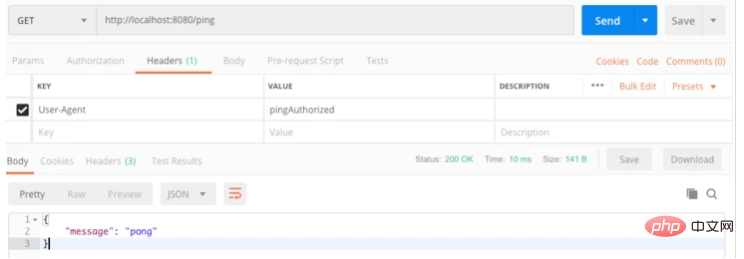
使用postman访问在Header中添加User-Agent访问/ping可以正常返回结果,如果去掉User-Agent则会返回我们设定的”No authorized for ping”。因为我们添加了iris的log middleware所以在访问时会在终端显示相应的log信息
取得请求参数,展示到html
bookinfo.html
<html>
    <head>Book information</head>
    <body>
        <h2>{{ .bookName }}</h2>
        <h1>{{ .bookID }}</h1>
        <h1>{{ .author }}</h1>
        <h1>{{ .chapterCount }}</h1>
    </body>
</html>
main.go
package main

import "github.com/kataras/iris"

func main() {
    app := iris.New()

    app.RegisterView(iris.HTML("./views", ".html"))

    app.Handle("GET", "/bookinfo/{bookid:string}", func(ctx iris.Context) {
        bookID := ctx.Params().GetString("bookid")

        ctx.ViewData("bookName", "Master iris")
        ctx.ViewData("bookID", bookID)
        ctx.ViewData("author", "Iris expert")
        ctx.ViewData("chapterCount", "40")

        ctx.View("bookinfo.html")
    })

    app.Run(iris.Addr(":8080"))
}
取得请求中带的参数
ctx.Params().GetString("bookid")
设置html中变量的值
ctx.ViewData(key, value)
route允许和禁止外部访问
实际使用中有时会有些route只能内部使用,对外访问不到。
可以通过使用 XXX_route.Method = iris.MethodNone设定为offline
内部调用通过使用函数 Context.Exec(“NONE”, “/XXX_yourroute”)
main.go
package main

import "github.com/kataras/iris"

import "strings"

func main() {
    app := iris.New()

    magicAPI := app.Handle("NONE", "/magicapi", func(ctx iris.Context) {
        if ctx.GetCurrentRoute().IsOnline() {
            ctx.Writef("I'm back!")
        } else {
            ctx.Writef("I'll be back")
        }
    })

    app.Handle("GET", "/onoffhandler/{method:string}/{state:string}", func(ctx iris.Context) {
        changeMethod := ctx.Params().GetString("method")
        state := ctx.Params().GetString("state")

        if changeMethod == "" || state == "" {
            return
        }

        if strings.Index(magicAPI.Path, changeMethod) == 1 {
            settingState := strings.ToLower(state)
            if settingState == "on" || settingState == "off" {
                if strings.ToLower(state) == "on" && !magicAPI.IsOnline() {
                    magicAPI.Method = iris.MethodGet
                } else if strings.ToLower(state) == "off" && magicAPI.IsOnline() {
                    magicAPI.Method = iris.MethodNone
                }

                app.RefreshRouter()

                ctx.Writef("\n Changed magicapi to %s\n", state)
            } else {
                ctx.Writef("\n Setting state incorrect(\"on\" or \"off\") \n")
            }

        }
    })

    app.Handle("GET", "/execmagicapi", func(ctx iris.Context) {
        ctx.Values().Set("from", "/execmagicapi")

        if !magicAPI.IsOnline() {
            ctx.Exec("NONE", "/magicapi")
        } else {
            ctx.Exec("GET", "/magicapi")
        }
    })

    app.Run(iris.Addr(":8080"))
}
测试:
<1>访问http://localhost:8080/magicapi,返回Not found。说明route magicapi对外无法访问
<2>访问http://localhost:8080/execmagicapi,返回I'll be back。在execmagicapi处理函数中会执行 ctx.Exec("GET", "/magicapi")调用offline的route magicapi。在magicapi中会判断自己是否offline,如果为offline则返回I'll be back。
<3>访问http://localhost:8080/onoffhandler/magicapi/on改变magicapi为online
<4>再次访问http://localhost:8080/magicapi,返回I'm back!。说明route /mabicapi已经可以对外访问了
grouping route
在实际应用中会根据实际功能进行route的分类,例如users,books,community等。
/users/getuserdetail
/users/getusercharges
/users/getuserhistory

/books/bookinfo
/books/chapterlist
对于这类route可以把他们划分在users的group和books的group。对该group会有共通的handler处理共同的一些处理
package main

import (
    "time"

    "github.com/kataras/iris"
    "github.com/kataras/iris/middleware/basicauth"
)

func bookInfoHandler(ctx iris.Context) {
    ctx.HTML("<h1>Calling bookInfoHandler </h1>")
    ctx.HTML("<br/>bookID:" + ctx.Params().Get("bookID"))
    ctx.Next()
}

func chapterListHandler(ctx iris.Context) {
    ctx.HTML("<h1>Calling chapterListHandler </h1>")
    ctx.HTML("<br/>bookID:" + ctx.Params().Get("bookID"))
    ctx.Next()
}

func main() {
    app := iris.New()

    authConfig := basicauth.Config{
        Users:   map[string]string{"bookuser": "testabc123"},
        Realm:   "Authorization required",
        Expires: time.Duration(30) * time.Minute,
    }

    authentication := basicauth.New(authConfig)

    books := app.Party("/books", authentication)

    books.Get("/{bookID:string}/bookinfo", bookInfoHandler)
    books.Get("/chapterlist/{bookID:string}", chapterListHandler)

    app.Run(iris.Addr(":8080"))
}
上例中使用了basicauth。对所有访问books group的routes都会先做auth认证。认证方式是username和password。
在postman中访问 http://localhost:8080/books/sfsg3234/bookinfo
设定Authorization为Basic Auth,Username和Password设定为程序中的值,访问会正确回复。否则会回复Unauthorized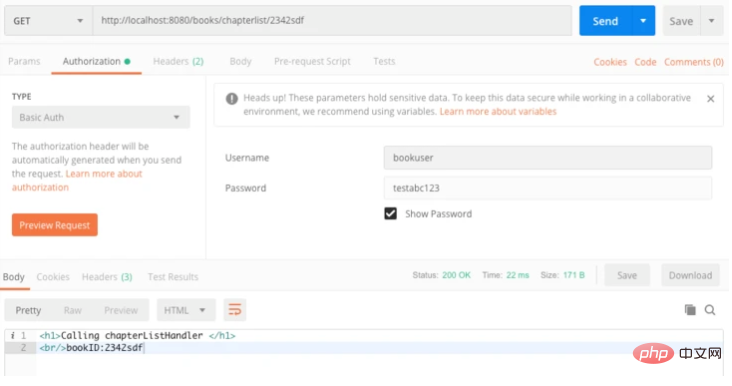
更多golang相关技术文章,请访问golang教程栏目!
以上就是解析golang iris怎么使用的详细内容,更多请关注亿码酷站其它相关文章!
解析golang iris怎么使用
—–文章转载自PHP中文网如有侵权请联系[email protected]删除
本文永久链接地址:https://www.ymkuzhan.com/31326.html

