


我们先来看下效果图:
(相关教程:CSS教程)
切换前:
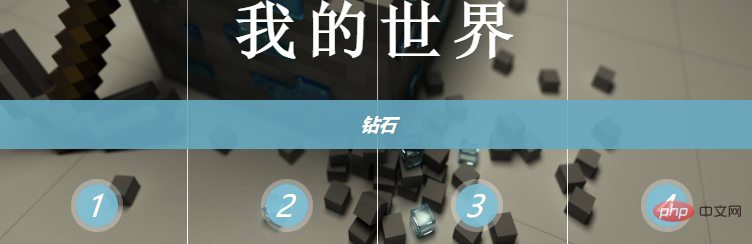
切换中: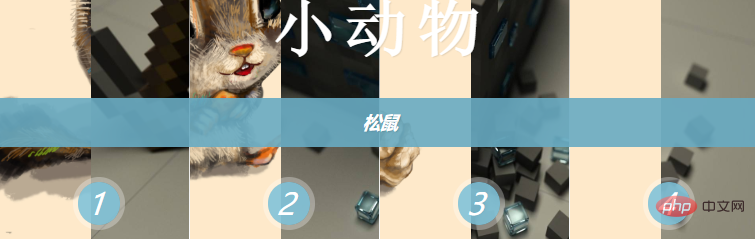
切换成功:
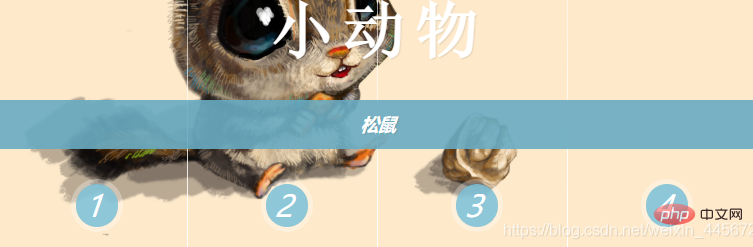
HTML代码:
<!doctype html>
<html>
<head>
<meta charset="utf-8">
<title>来自Limou的尝试解读</title>
<link href="CSS/Public.css" rel="stylesheet" type="text/css">
</head>

<body style="background-color:#EAF5FF;">
		<div><h1>来自Limou的尝试解读</h1></div>
		<div class="button">
			<a href="#">1</a>
			<a href="#">2</a>
			<a href="#">3</a>
			<a href="#">4</a>

		<div class="Images">
			<!--选中第一个input-->
			<input id="in-img-1" name="InpitImages" class="cr-in-img-1" type="radio" checked>
			<label for="in-img-1" class="la-checkLabel-1">1</label>

			<input id="in-img-2" name="InpitImages" class="cr-in-img-2" type="radio">
			<label for="in-img-2" class="la-checkLabel-2">2</label>

			<input id="in-img-3" name="InpitImages" class="cr-in-img-3" type="radio">
			<label for="in-img-3" class="la-checkLabel-3">3</label>

			<input id="in-img-4" name="InpitImages" class="cr-in-img-4" type="radio">
			<label for="in-img-4" class="la-checkLabel-4">4</label>
			<div class="SpanStyle">
				<div>
					<span>Images1</span>
					<span>Images2</span>
					<span>Images3</span>
					<span>Images4</span>
				</div>
				<div>
					<span>Images1</span>
					<span>Images2</span>
					<span>Images3</span>
					<span>Images4</span>
				</div>
				<div>
					<span>Images1</span>
					<span>Images2</span>
					<span>Images3</span>
					<span>Images4</span>
				</div>
				<div>
					<span>Images1</span>
					<span>Images2</span>
					<span>Images3</span>
					<span>Images4</span>
				</div>
			</div>
			<div class="h3Span">
				<h3><span>我的世界</span><span>钻石</span></h3>
				<h3><span>小动物</span><span>松鼠</span></h3>
				<h3><span>上古卷轴</span><span>雪漫城随从</span></h3>
				<h3><span>守望先锋</span><span>不知道是谁</span></h3>
			</div>
		</div>
    </div>
</body>


</html>
CSS代码:
@charset "utf-8";
/* CSS Document */

h1{
	text-align: center;
	color:deepskyblue;
	text-shadow: 1px 1px 1px rgba(0,0,0,0.1);/*设置字体的阴影*/
}
/*顶部a标签动画与样式  开始*/
.button{
	text-align: center;
	height: 80px;
	width: 100%;
	display: block;
}
.button a{
	height: 60px;
	width: 60px;
	display: inline-block;/*布局属性:内联-块,
	使其成为并排显示的块级元素,让其宽高可以编辑,且宽高和内外边距可以超过父级元素*/
	text-decoration: none;/*去除下划线*/
	line-height: 60px;
	border-radius: 50%;
	/*设置字符的行高,通常用于自定义的某些样式,字符在顶部或底部时使用,让其上下居中*/
	background-color: rgba(104,171,194,0.5);
	transition:background-color 0.15s linear;/*组合写法*/
	/*transition-property	规定设置过渡效果的 CSS 属性的名称。
				-duration	规定完成过渡效果需要多少秒或毫秒。
				-timing-function	规定速度效果的速度曲线。
				-delay	定义过渡效果开始时间。*/
	color: white;
}
.button a:hover{
	background-color: rgba(255,255,255);
	color:#68ABC2;
	transition:background-color 0.15s linear;
}
/*顶部a标签动画与样式  开始*/


/*图片的样式与动画  开始*/
.SpanStyle{
	width: 100%;
	height: 400px;
	z-index: 1;
	position: absolute;
	top: 0;
	background-repeat: no-repeat;
	background-size: 100% 100%;
	background-position: 0 0;
}
.SpanStyle div{
	width: 25%;
	height: 100%;
	float: left;
	position: relative;
	overflow: hidden;
	background-repeat: no-repeat;
}
.SpanStyle div span{
	position: absolute;
	width: 100%;
	height: 100%;
	top: 0px;
	left: -100%;/*设置元素初始位置,为动画准备*/
	z-index: 2;
	color: rgba(255,255,255,0);
	background-repeat: no-repeat;
	background-size: 400% 100%;
}

/*设置图片在元素的位置*/
.SpanStyle div:nth-child(1) span{
	background-position: 0% 0px;
}
.SpanStyle div:nth-child(2) span{
	background-position: 33.5% 0px;
}
.SpanStyle div:nth-child(3) span{
	background-position: 66.5% 0px;
}
.SpanStyle div:nth-child(4) span{
	background-position: 100% 0px;
}

/*父级元素下的 某个input标签和 它的类名:选中后匹配元素(单复选框专用) ~
一个父级元素下的div里面的Span元素:匹配元素(第N个) */
/*定义指定的input标签点击后将匹配的元素绑定新图片*/
.Images input.cr-in-img-1:checked ~ .SpanStyle,
.SpanStyle div span:nth-child(1){
	background-image: url(../images/1.jpg);
}
.Images input.cr-in-img-2:checked ~ .SpanStyle,
.SpanStyle div span:nth-child(2){
	background-image: url(../images/2.jpg);
}
.Images input.cr-in-img-3:checked ~ .SpanStyle,
.SpanStyle div span:nth-child(3){
	background-image: url(../images/3.jpg);
}
.Images input.cr-in-img-4:checked ~ .SpanStyle,
.SpanStyle div span:nth-child(4){
	background-image: url(../images/4.jpg);
}

/*定义指定的input标签点击后将绑定的新图片所在的元素插入*/
.Images input.cr-in-img-1:checked ~ .SpanStyle div span:nth-child(1),
.Images input.cr-in-img-2:checked ~ .SpanStyle div span:nth-child(2),
.Images input.cr-in-img-3:checked ~ .SpanStyle div span:nth-child(3),
.Images input.cr-in-img-4:checked ~ .SpanStyle div span:nth-child(4)
{
	animation: none;
	transition: left 0.8s ease-in-out;
	left: 0%;
	z-index: 10;
}

/*定义指定的input标签点击后将要替换的旧图片所在的元素撤出*/
.Images input:checked ~ .SpanStyle div span{
	animation: slideOut 0.8s ease-in-out;
}

@keyframes slideOut{
	0%{ left: 0%; }
	100%{ left: 100%; }
}
/*图片的样式与动画  结束*/


/*文本动画与样式  开始*/
.Images{
	height: 400px;
	width: 40%;
	text-align: center;
	position: relative;
	margin: 2% auto 0 auto;
	border: 20px solid #fff;
	box-shadow: 1px 1px 3px rgba(0,0,0,0.1);
}
.Images input{
	display: none;
}
.Images label{
	font-style: italic; /*字体样式:倾斜*/
	margin-top: 350px;
	text-align: center;
	width: 25%;
	height: 30px;
	cursor: pointer;/*光标:手*/
	color: #fff; /*字体颜色*/
	position: relative;
	float: left;
	line-height: 34px;
	font-size: 24px;/*字号,字体大小*/
	z-index: 5;
}
.Images label:before{
	content:'';/*绑定文本也可以绑定文件*/
	width: 34px;
	height: 34px;
	background: rgba(130,195,217,0.9);
	position: absolute;
	left: 50%;
	margin-left: -14px;
	border-radius: 50%;
	box-shadow: 0px 0px 0px 4px rgba(255,255,255,0.3);
	z-index:-1;
}
.Images label:after{
	width: 1px;
	height: 400px;
	content: '';
	background: -webkit-linear-gradient(top, rgba(255,255,255,0) 0%, rgba(255,255,255,1) 100%);
    position: absolute;
	bottom: -20px;
	right: 0px;
}

.h3Span h3{
	position: absolute;
	width: 100%;
	top: 45%;
	z-index: 10;
	text-align: center;
	opacity: 0;
	color: #fff;
	text-shadow: 1px 1px 1px rgba(0,0,0,0.1);
	transition: opacity 0.8s ease-in-out;
}
.h3Span h3 span{
	z-index: 10;
	position: absolute;
	width: 100%;
	left: 0px;
	text-align: center;
	opacity: 1;
}
.h3Span h3 span:nth-child(1){
	font-family: 'NSimSun';
	font-size: 50px;
    display: block;
    letter-spacing: 7px;
}
.h3Span h3 span:nth-child(2){
	margin-top: 84px;
	letter-spacing: 0px;
	background: rgba(104,171,194,0.9);
	font-size: 14px;
	padding: 10px 0px;
	font-style: italic;
	transition: opacity 0.8s ease-in-out;
}

.Images input.cr-in-img-1:checked ~ .h3Span h3:nth-child(1),
.Images input.cr-in-img-2:checked ~ .h3Span h3:nth-child(2),
.Images input.cr-in-img-3:checked ~ .h3Span h3:nth-child(3),
.Images input.cr-in-img-4:checked ~ .h3Span h3:nth-child(4){
	opacity: 1;
}
/*文本的动画与样式  结束*/


/*页面缩小显示复选框*/
@media screen and (max-width: 1200px) {
	.Images input{
		display: inline;
		width: 22%;
		margin-top: 350px;
		z-index: 10;
		position: relative;
	}
	.Images label{
		display: none;
	}
}
css实现点击切换图片效果
—–文章转载自PHP中文网如有侵权请联系admin#tyuanma.cn删除
认识Ajax基础之数据请求
转载请注明来源:css实现点击切换图片效果_编程技术_编程开发技术教程
本文永久链接地址:https://www.ymkuzhan.com/807.html
本文永久链接地址:https://www.ymkuzhan.com/807.html
下载声明:
本站资源如无特殊说明默认解压密码为www.ymkuzhan.com建议使用WinRAR解压; 本站资源来源于用户分享、互换、购买以及网络收集等渠道,本站不提供任何技术服务及有偿服务,资源仅提供给大家学习研究请勿作它用。 赞助本站仅为维持服务器日常运行并非购买程序及源码费用因此不提供任何技术支持,如果你喜欢该程序,请购买正版! 版权声明:
下载本站资源学习研究的默认同意本站【版权声明】若本站提供的资源侵犯到你的权益,请提交版权证明文件至邮箱ymkuzhan#126.com(将#替换为@)站长将会在三个工作日内为您删除。 免责声明:
您好,本站所有资源(包括但不限于:源码、素材、工具、字体、图像、模板等)均为用户分享、互换、购买以及网络收集而来,并未取得原始权利人授权,因此禁止一切商用行为,仅可用于个人研究学习使用。请务必于下载后24小时内彻底删除,一切因下载人使用所引起的法律相关责任,包括但不限于:侵权,索赔,法律责任,刑事责任等相关责任,全部由下载人/使用人,全部承担。以上说明,一经发布视为您已全部阅读,理解、同意以上内容,如对以上内容持有异议,请勿下载,谢谢配合!支持正版,人人有责,如不慎对您的合法权益构成侵犯,请联系我们对相应内容进行删除,谢谢!

